
linux-commands-check-highest-disk
Table of Contents
Check Which Folders Use The Highest Disk Space In Linux
This command is helpful to track the disk usage and bring it down to the disk usage hogs.
Command
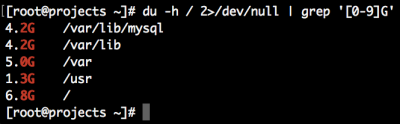
du -h <dir> 2>/dev/null | grep '[0-9\.]\+G'
Replace <dir> with your desired directory (for root use / )
Output
Explanation
du -h
Shows the directory and the sizes of each in a human readable format.
2>/dev/null
Discards output of non directories (such as /proc/)
grep '[0-9\.]\+G'
Sorts out directories that is 1+ GBs and up.
Reference
linux-commands-check-highest-disk.txt · Last modified: by jsanders